
TL;DR
Smart kitchen gadgets connect sensors, appliances, or controls to your home network so you can check status, get alerts, or use supported app and voice features. Start with a clear everyday problem, check compatibility and offline controls, and favor monitoring over remote activation for heat-producing appliances. A connected feature is only worth paying for if it fits your habits and remains useful over time.
Choose a gadget for one repeated kitchen task, such as cooking alerts or refrigerator status.
Favor monitoring and alerts over remote activation for heat-producing appliances.
Check exact model support, required apps or accounts, subscriptions, Wi-Fi needs, and offline controls.
Use smart plugs only when the plug and appliance makers’ guidance support that use.
Review privacy settings, use unique passwords, install updates, and check the maker’s software-support policy.

Get kitchen staples and gadgets delivered free with Prime
- Fast, free delivery on millions of items
- Prime Video, Amazon Music and more included
- Member-only deals all year
What counts as a smart kitchen gadget—and what does it actually do?
A smart kitchen gadget connects a sensor, appliance, or control to your home network so you can monitor or operate supported functions through an app, voice assistant, or automation. That might mean a thermometer that sends a phone alert, a refrigerator that reports a temperature problem, or an oven that shows its timer. The label covers a wide range, from small add-ons to major appliances.
Take a connected cooking thermometer: you put its probe into a roast, choose a target temperature, and get an alert when it reaches that point. You can keep chopping vegetables instead of opening the oven every few minutes. Some products offer guided cooking or recipe help, but features vary by model and may depend on the maker’s app, an account, or cloud access.
Smart kitchen gadgets for one clear job can be easier to judge than an appliance with a long list of app features. Ask what you want to happen: see a reading, receive a warning, or switch something on? A light on an appliance is like a note on the fridge; a useful connected alert can reach you when you’re out of the room. Still, a gadget that depends on a weak signal may add friction instead of removing it.
For food safety, follow the device maker’s instructions and trusted food-safety guidance rather than relying on a connectivity feature alone. A phone reading does not remove the need to handle and store food safely. For example, an alert can prompt you to check a refrigerator, but you still need to act on the food according to safe handling guidance.
Products Worth Considering

Ninja Foodi 6-in-1 DualZone FlexBasket Air Fryer, 7-Qt MegaZone, Black, DZ071
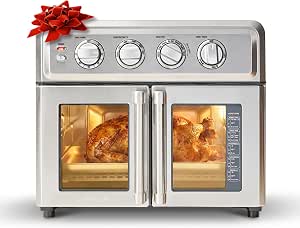
Cuisinart Artisan French-Door Air Fryer Toaster Oven, 7 Functions

De’Longhi Rivelia Fully Automatic Espresso Machine with Grinder and Milk Frother, Beige
As an affiliate, we earn on qualifying purchases.
Which smart kitchen gadgets earn their place on your counter?
Kitchen gadgets for the smart home are most worthwhile when they make a frequent task safer, easier, or more reliable. For many households, monitoring tools—such as cooking thermometers, appliance status checks, and temperature alerts—solve a clearer problem than remote start buttons. The right pick depends on what you cook and what you already own.
If you often roast meat while preparing side dishes, a connected thermometer can send a target-temperature alert so you don’t keep opening the oven. If you leave home wondering whether you closed the refrigerator, an appliance status feature may ease that worry. A smart plug might help track the energy use of a suitable device, but it does not make every appliance safe for remote switching.
| Gadget | Useful job | Check before buying |
|---|---|---|
| Connected thermometer | Send cooking temperature alerts | Probe instructions, app dependence, and range |
| Smart plug | Schedule or monitor a suitable device | Power rating and appliance maker’s guidance |
| Connected oven | Show status, timers, or supported settings | Remote-control rules and offline controls |
| Smart refrigerator | Provide alerts or service information | Long-term software support and subscription terms |
Imagine two shoppers: one buys an app-enabled refrigerator because its screen looks impressive; the other chooses a thermometer after repeatedly overcooking Sunday chicken. The second purchase has an obvious job and a result the household can judge. Yet the refrigerator could be worthwhile if its alerts address a real concern or its other features suit the family. The test is whether the gadget earns its space and cost in your actual routine.
Food gadgets can involve allergens, too. If an app suggests recipes or tracks ingredients, check the ingredient list yourself for allergens relevant to your household. A recommendation screen cannot replace reading packaging or preventing cross-contact.
How do you check compatibility before you buy?
Smart kitchen gadgets work smoothly only when their exact model supports your phone, Wi-Fi, and preferred smart-home platform in the way you expect. Compatibility labels don’t guarantee every feature works through every assistant. Check the product’s model-specific details, because a basic status alert and an advanced automation may have different requirements.
- Write down your setup. Note your phone, Wi-Fi band or router limits, voice assistant, and smart-home platform. If you don’t use voice control, you may not need to pay extra for it.
- Check the exact model and features. Look for the functions you actually want, such as a temperature alert or timer. A Matter logo signals an effort toward cross-platform support, but feature coverage still varies by product.
- Read the account and service terms. Find out whether setup needs the manufacturer’s app, an account, a subscription, or a cloud connection. Check which controls remain available if a service is unavailable.
- Look for support details. Find the maker’s software-update policy and instructions for basic manual operation. Ask whether the core task still works if Wi-Fi drops.
For instance, a renter who only wants a counter thermometer can skip complex kitchen-wide automations and focus on whether the probe, app, and phone work together. A homeowner building around an existing voice assistant may care more about exact integrations. Matter aims to make compatible smart-home products work across participating platforms, but it doesn’t promise that every appliance-specific function appears everywhere.
Think of platform support like a key that fits only certain doors: the brand name on the box doesn’t tell you whether the particular feature you want will open the one in your house. If the product page is vague, check the manufacturer’s help pages or manual before purchasing.
How can you keep connected cooking safe?
Remote monitoring is usually a safer, clearer benefit than remote activation for ovens and other heat-producing appliances. A timer or temperature alert tells you what is happening; remote start can begin heating when nobody is nearby. Follow the manufacturer’s instructions and never treat a phone app as a substitute for supervision.
Suppose you’re walking the dog and receive an oven notification. It may help you remember that cooking is underway, but you should not assume every oven can safely be started or left unattended through an app. Different appliances have different interlocks and rules. Read the manual for the exact model, and keep ordinary controls accessible to the person using the kitchen.
Smart plugs need the same care. Their power rating and the appliance’s operating behavior matter, and some devices are unsuitable for remote power switching. A coffee maker that resumes its last state after power returns behaves differently from one that requires a fresh button press. Check both manufacturers’ guidance rather than assuming a plug makes any device smart or safe.
An alert can help you notice a cooking task; it cannot watch the kitchen for you.
Store and handle food safely as well. A connected thermometer can report a probe reading, but you must place and use it according to its instructions and follow reliable guidance for safe cooking and storage. If a device gives an unexpected reading or loses connection, use the appliance’s normal controls and a trusted thermometer or food-safety reference rather than guessing. Connected tools can support safe habits, not replace them.
Will smart features save money and protect your privacy?
Smart kitchen gadgets don’t automatically save energy or money. Consumption readings and maintenance alerts can show you how a device behaves, but savings depend on your habits, appliance efficiency, local energy prices, and any subscription or installation costs. A dashboard is useful only if it helps you make a change you’ll keep.
For example, a smart plug might reveal that a suitable countertop appliance draws power while idle. That reading gives you information, not a guaranteed bill reduction; you still have to decide whether a schedule is safe and useful. A service reminder may help you clean a filter on time, while a paid plan for routine notifications could cost more than the benefit. Compare purchase price, ongoing fees, installation, expected lifespan, and the job you want solved.
Connected devices may collect usage data and need an account. Use a strong, unique password, install updates, secure your home network, and review privacy settings to see what information the maker collects and shares. If you don’t want voice assistants, choose a device that works through its app or physical controls without them.
Plan for a day when your internet or the manufacturer’s service is down. Some gadgets keep basic controls working locally; others lose remote features. Before buying an expensive refrigerator or oven, find out which functions need Wi-Fi, an account, a paid plan, or cloud access, and look for a clear software-support policy. A connected appliance can outlast its app, so make sure its offline basics still serve your household.
What should you do before adding a gadget to your kitchen?
The best way to buy a smart kitchen gadget is to start with a repeated annoyance, then check whether the device solves it safely and reliably. Don’t begin with the feature list. Begin with a moment you recognize: dinner timing slips, you worry about a door left open, or you want to understand an appliance’s energy use.
- Name the task. Write one sentence, such as “I want an alert when the roast reaches its target temperature.”
- Pick the simplest fitting tool. Compare a focused thermometer with a new oven; the smaller device may handle the job at lower cost.
- Confirm safety and fit. Check manufacturer guidance, power needs, phone compatibility, Wi-Fi requirements, and any subscription.
- Test the offline routine. Learn how to use the basic controls if the app or internet is unavailable.
- Review after a few weeks. Keep it if you use it and trust it; if it sits untouched, the feature may not suit your habits.
Picture a small apartment kitchen with limited counter space. A connected scale that guides a weekly bread recipe may earn its spot, while a large smart display may not. In another home, a refrigerator alert could be valuable because groceries are expensive and the door gets opened often by children. The same product can feel essential in one kitchen and like clutter in another.
Voice control and alerts can help people who find reaching a control or watching a timer difficult, but setup complexity and app dependence can create barriers. Choose controls that the household can use comfortably. A good gadget should fit the people cooking, the kitchen’s space, and the routine you already have.
Frequently Asked Questions
What counts as a smart kitchen gadget?
It’s a connected sensor, appliance, or control that lets you monitor or operate supported functions through an app, voice assistant, or automation. Examples range from a connected thermometer to a smart refrigerator.
Which smart kitchen gadgets are worth buying first?
Start with a tool that solves a repeated problem, such as a cooking thermometer that sends a temperature alert or an appliance feature that warns you about a refrigerator issue. The best first buy depends on your routine and existing devices.
Do smart kitchen appliances work with Alexa, Google Home, Apple Home, or Matter?
Support varies by exact model and feature. Check the manufacturer’s compatibility details for the function you want; a platform logo does not guarantee that every setting or automation works there.
Can I control an oven remotely, and is that safe?
Some ovens offer remote features, but you should follow the exact model’s instructions and safety rules. Monitoring and alerts are often more useful than starting a heat-producing appliance remotely, and an app does not replace supervision.
Do smart kitchen gadgets need Wi-Fi or a subscription?
Many use Wi-Fi, a manufacturer’s app, an account, or cloud services; some features may also require a paid plan. Check which functions keep working if your internet or the maker’s service is unavailable.
Can I use a smart plug with a coffee maker or air fryer?
Only if the smart plug’s rating and both manufacturers’ instructions support that use. Appliance behavior after power returns matters, so don’t assume a smart plug makes remote switching suitable for every device.
Do smart kitchen gadgets save energy or money?
Energy data and maintenance reminders can help you spot patterns, but savings depend on your behavior, the appliance, local prices, and ongoing costs. Treat readings as information you can act on, not a promise of lower bills.
How can I protect privacy with connected kitchen devices?
Review the maker’s privacy settings and data practices, use a strong unique password, secure your home network, and install updates. Check whether the gadget requires an account or cloud service for the features you plan to use.