
The KitchenAid Artisan Series 5 Quart Tilt Head Stand Mixer is a versatile and durable kitchen companion, built to handle a variety of mixing tasks. To keep it performing at its best, regular maintenance is essential. Proper cleaning, inspection, and troubleshooting can extend its lifespan and ensure consistent results every time you bake or cook.
In this guide, we’ll walk you through the practical steps of maintaining your KitchenAid mixer safely and effectively. Whether you’re a new owner or a seasoned user, these tips will help you troubleshoot common issues and keep your mixer running smoothly for years to come.
Key Takeaways
| Regular cleaning prolongs lifespan | Clean your mixer after each use to prevent buildup and ensure smooth operation. |
| Inspect and tighten parts | Regularly check and tighten loose components to avoid operational issues. |
| Lubricate moving parts | Use appropriate lubricants for optimal performance and to prevent wear. |
| Troubleshoot common problems | Identify and resolve issues like noise, overheating, or motor problems promptly. |
| Safe maintenance practices | Always unplug the mixer before cleaning or inspecting to ensure safety. |

KitchenAid Artisan Series 5 Quart Tilt Head Stand Mixer with Pouring Shield KSM150PS, Milkshake
Built to take it all on with the durable and built-to-last metal construction, and 59 touchpoints around the...
As an affiliate, we earn on qualifying purchases.
Cleaning Your KitchenAid Mixer
- Unplug the mixer from the power outlet to ensure safety.
- Remove the bowl, beater, and pouring shield. Wash them with warm, soapy water. These parts are dishwasher safe, but hand washing prolongs their life.
- Use a damp cloth to wipe down the mixer’s body, paying attention to touchpoints and crevices. Avoid harsh abrasives that could damage the finish.
- Clean the attachment hub and the area around the head to remove flour, dough, or food particles that may have accumulated.
- Dry all parts thoroughly before reassembling to prevent rust or corrosion.
Regular cleaning not only keeps your mixer looking new but also prevents buildup that can affect its performance.
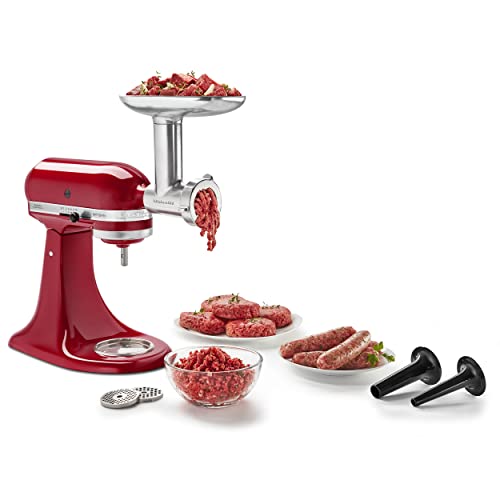
KitchenAid Stand Mixer Attachment, Food Grinder KSMMGA, Metal Food Grinder
Connect to any household KitchenAid Stand Mixer power hub and use the power of the motor to run...
As an affiliate, we earn on qualifying purchases.
Inspecting and Tightening Components
Routine inspection is critical for safe operation. Every few months, check the following:
- **Tilt-head latch:** Ensure it locks securely and does not wobble.
- **Beater and attachment mounts:** Confirm they are properly attached and not loose.
- **Bowl and accessories:** Look for cracks or damage.
- **Power cord:** Check for frays or cuts. Replace if damaged.
If you notice any loose parts, tighten screws or bolts carefully using the appropriate tools. Do not overtighten, as this can cause damage. Addressing these issues early can prevent more costly repairs later.
Lubricating Moving Parts
The KitchenAid Artisan mixer is designed with maintenance in mind. To keep it running smoothly:
- Use a food-grade lubricant on the beater shaft and other moving parts as recommended by the manufacturer.
- Avoid over-lubricating—apply a small amount and wipe off excess.
- Never lubricate electrical components or the motor itself.
This lubrication reduces friction, minimizes wear, and ensures the mixer operates quietly and efficiently over time.
Troubleshooting Common Issues
If your mixer encounters problems, follow these troubleshooting steps:
- Unusual noise: Check for loose attachments or debris. Tighten or clean as needed.
- Overheating: Allow the motor to cool down by turning off the mixer and unplugging it for 15-20 minutes.
- Mixer not starting: Ensure it’s plugged in and the power outlet is functioning. Test with another device if necessary.
- Speed control issues: Clean the speed control switch with a dry cloth. If persistent, contact a technician.
Regularly inspecting and addressing these issues can prevent breakdowns and extend your mixer’s lifespan.
Safe Maintenance Practices
Always prioritize safety when maintaining your KitchenAid mixer:
- Unplug the mixer before cleaning, inspecting, or performing any maintenance.
- Use only manufacturer-approved parts and lubricants.
- Do not attempt to repair electrical components unless qualified.
- Follow the manual’s instructions for disassembly and reassembly.
By following these safety tips, you can enjoy hassle-free maintenance without risking injury or damaging your appliance.
The Products in This Guide

KitchenAid Artisan Series 5 Quart Tilt Head Stand Mixer
- ✔ Weight: 26 lbs
- ✔ Dimensions: 14 x 8 x 14 inches
- ✔ Warranty: 1 Year

KitchenAid Stand Mixer Attachment
- ✔ Weight: 5 lbs
- ✔ Dimensions: 8 x 6 x 4 inches
- ✔ Warranty: 1 Year
KitchenAid Artisan Series 5 Quart Tilt Head Stand Mixer
The KitchenAid Artisan Series 5 Quart Tilt Head Stand Mixer is built to last with its durable metal construction and 59 touchpoints for thorough mixing. Its 5-quart stainless steel bowl is perfect for small or large batches, making it ideal for home bakers. The tilt-head design offers easy access to the bowl, simplifying the addition of ingredients and cleaning. With 10 speeds, it can handle everything from gentle stirring to whipping cream at high speed. Its wide range of colors allows you to match your kitchen decor.
Pros:
- Robust metal construction for durability
- Easy tilt-head access for cleaning and adding ingredients
- Multiple speed options for versatile use
- Large 5-quart bowl suitable for big batches
Cons:
- Heavier than some plastic models
- No digital display for speed or timer
- Can be noisy at high speeds
Best for: Home bakers who need a reliable, high-capacity mixer with versatile functions.
Not ideal for: Those seeking a lightweight or budget-friendly option.
Bottom line: A durable, versatile stand mixer that combines power with style for everyday baking needs.
KitchenAid Stand Mixer Attachment
The KitchenAid Metal Food Grinder attachment adds incredible versatility to your stand mixer, enabling you to grind meats, vegetables, and more with ease. Its durable construction and multiple grinding plates make it ideal for creating fresh, custom foods at home. Easy to attach and clean, it complements the mixer perfectly for a comprehensive kitchen upgrade.
Pros:
- Sturdy metal construction for longevity
- Includes fine, medium, and coarse plates
- Large food tray for bigger batches
- Easy to disassemble for cleaning
Cons:
- Requires pre-chilling for best results
- Attachment sold separately
- Adds some complexity to cleaning
Best for: Home cooks who want to make fresh ground meats or vegetables regularly.
Not ideal for: Those who do not frequently grind ingredients or prefer pre-packaged foods.
Bottom line: A robust attachment that unlocks endless fresh food possibilities with your KitchenAid mixer.
Frequently Asked Questions
How often should I clean my KitchenAid stand mixer?
It’s best to clean your mixer after each use to prevent buildup and ensure optimal performance. Regular inspection and cleaning will extend its lifespan.
Can I use any attachment with my KitchenAid mixer?
Only attachments designed for KitchenAid stand mixers, such as the Food Grinder or Pasta Roller, are compatible. Confirm your model’s compatibility before purchasing.
What is the best way to troubleshoot motor overheating?
Allow the mixer to cool down by turning it off and unplugging it for 15-20 minutes. Avoid overloading the bowl or running the mixer at high speeds continuously.
Is it safe to use water or cleaning sprays on the motor housing?
No, avoid getting water or sprays directly on the motor housing. Use a damp cloth for cleaning the exterior and keep electrical parts dry.
How can I ensure my mixer’s longevity?
Regular cleaning, inspection, proper attachment handling, and avoiding overloading will help maintain your mixer’s performance for years.
Keep Your KitchenAid Mixer in Top Shape
Maintaining your KitchenAid Artisan Series 5 Quart Tilt Head Stand Mixer is straightforward when you follow regular cleaning and inspection routines. Addressing minor issues early prevents larger problems and helps your mixer operate smoothly for many years. With proper care, your versatile kitchen companion will continue to serve you well, whether baking cookies or making homemade pasta.
Affiliate disclosure: As an Amazon Associate we earn from qualifying purchases. Prices and availability are accurate as of the time of publishing.